
Check photo details in your gallery
- Open the photo in Google Photos or Samsung Gallery.
- In Google Photos, open the photo details and look for the available information and location map.
- To check photo details on Samsung, open Details in Samsung Gallery and look for the location information.
- If you need to check the exported file before sharing, inspect that specific file as well.
Menus and available details differ by device and version. A gallery's details panel and the file it supplies to another app can show different information.
Inspect the file in MetaQuiet
- Make the photo available on your phone. Use an original export if you want to investigate the source file rather than an edited or shared copy.
- Open MetaQuiet and choose Photos & videos for the system photo picker, or Browse Files for the system file picker.
- Read the supported metadata blocks and readable fields found in the selected file.
- Review any notes about what cleaning removes and what stays. A minimal technical orientation record is retained for correct display.
- Stop after inspection if you only want to view the data. Creating a clean copy is a separate action.
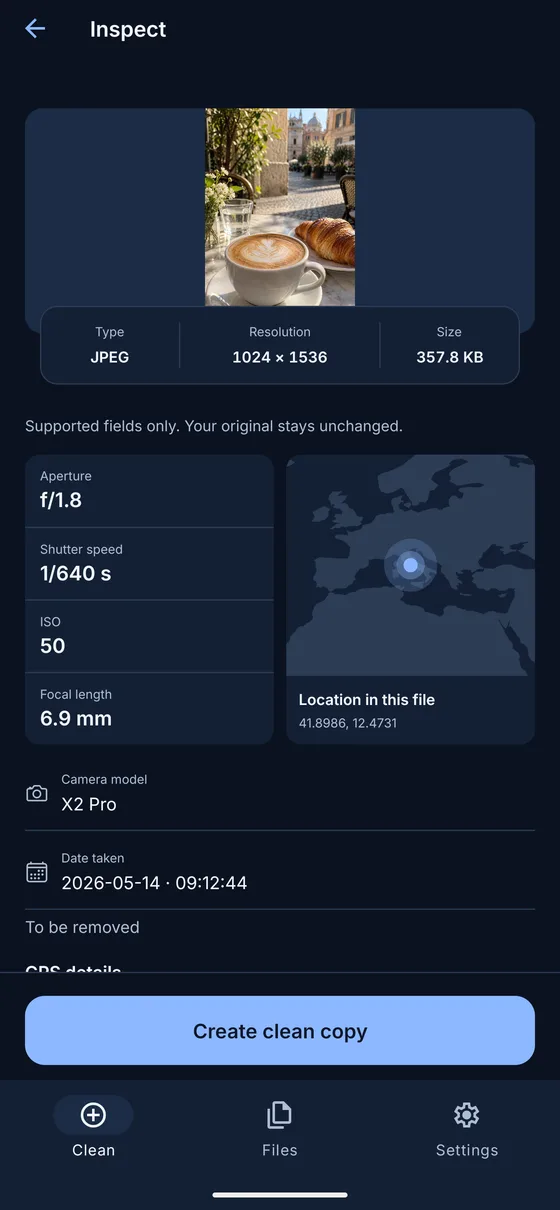
Inspection happens on your device, with no uploads or account required. It does not change the original.
Why a camera photo's location is missing
Android hides the stored location of camera photos from apps without media location access. This applies to both Photos & videos and Browse Files. MetaQuiet deliberately does not request that access, so switching pickers will not reveal the location.
Google Photos or Samsung Gallery may show a location while MetaQuiet shows none. The gallery view and the metadata Android makes available to MetaQuiet are different. The original on your phone may still contain location data.
Screenshots and files received from others usually show their fields normally. Location can appear when it is present and available in those files; a screenshot or received photo is not guaranteed to contain coordinates.
If you create a clean copy in MetaQuiet, that copy contains no location whichever picker you used. The original stays unchanged and may still hold it.
Read fields and blocks separately
Photo metadata can describe camera equipment, exposure settings, dates and location. Which readable fields appear depends on what the selected file contains and what MetaQuiet supports reading.
Read each date's label rather than assuming every date is the moment the shutter was pressed. Metadata may describe capture, creation or modification, and values can be edited or carried over from another version.
A metadata block is a container for information. One EXIF block can hold several fields. A block may be detected even when its individual values are not available in the readable preview.
An empty field preview is different from a report that no supported removable blocks were found. Neither authenticates the photographer or proves the picture's history. Inspection describes the selected file, not every earlier version of it.
Check limits and choose the next step
Photos have a 50 MB limit and are handled one at a time. HEIC, HEIF and AVIF support is for still images; TIFF support is for classic TIFF. RAW and BigTIFF are rejected. An extension alone does not guarantee a supported variant, and renaming it does not convert the file.
If you want to remove supported descriptive fields, create a separate clean copy. MetaQuiet gives it a random file name, rescans it and reports what was removed and what stays. You can save or share it from the result screen.
The visible picture remains, including faces, signs and other identifying details. A minimal technical orientation record stays, and a JPEG motion photo loses its motion part.
For a final check, inspect the actual saved or received copy. Android's camera-photo location restriction still applies, so a missing location in that inspection is not evidence that the original has none.
Common questions
Why does Samsung Gallery show a location but MetaQuiet does not?
Android hides stored camera-photo location from apps without media location access, which MetaQuiet deliberately does not request. This applies to both pickers, and the original may still contain the location.
Do I have to remove metadata to view EXIF data on Android?
No. You can inspect the supported fields in MetaQuiet and leave without creating a clean copy.
Can MetaQuiet change a photo's capture date?
No. It can inspect supported metadata and remove it from a separate copy, but it does not edit individual dates or locations.
Why do two copies of the same photo show different metadata?
Editors, photo providers and sharing services may supply different versions of a picture. Inspect the specific file you plan to share rather than assuming its fields match the original.
MetaQuiet is on the App Store for iPhone and iPad and on Google Play for Android.
Get MetaQuietThis guide in other languages: Deutsch, Español, Français, Italiano, Português (Brasil), Türkçe, 日本語, 한국어