
Choose the shortest route for your file
- Public photo with nothing sensitive: an online remover may be a reasonable choice if you are comfortable sending the original to its operator.
- ID document, contract, photo of a child or anything you would not email to a stranger: choose on-device processing.
- Only need to exclude an iPhone photo's location when sharing: no extra app is needed. Open "Options" at the top of the share sheet and switch "Location" off.
The iPhone sharing option addresses location in the shared copy, not all metadata. Menus differ by device and version.
What an online metadata remover does
A server-based online remover receives your uploaded file, processes it on someone else's server and returns a copy. The operator receives the original before its metadata is removed.
That tradeoff may be acceptable for a photo you already intend to make public. For an ID document or contract, the upload includes the readable content as well as metadata. Cleaning the returned file does not undo that disclosure.
When looking for a free online EXIF remover, check its upload and retention terms as well as its price. A free service still needs to explain what happens to the original file.
Check these details in any tool
- Original handling: does it create a separate copy, and does the service retain the uploaded original? These are different questions.
- Processing location: does the file stay on your device or get uploaded to a server?
- Removal scope: which metadata blocks does it remove, and which fields or embedded content remain?
- Verification: can you inspect the returned file and see what was removed?
- Media changes: does it re-encode the picture, video or sound, or preserve the encoded media?
- Limits: does it accept your actual file format, variant and size?
For online PDF metadata removal, distinguish document properties from page text, annotations and embedded content. For online video metadata removal, check whether the tool removes container tags and whether it re-encodes the video. Do not assume every remover does the same work.
Clean a separate copy on your phone
- Open MetaQuiet and choose "Photos & videos" for the system photo picker or "Browse Files" for the system file picker.
- Select one file and review the supported metadata blocks and readable fields found.
- Clean the file to create a separate copy with a random file name. The original is never changed.
- Review the result after the copy is rescanned. Check what was removed and the notes about what stays.
- Save the clean copy to the photo library or Files, or share it from the result screen.
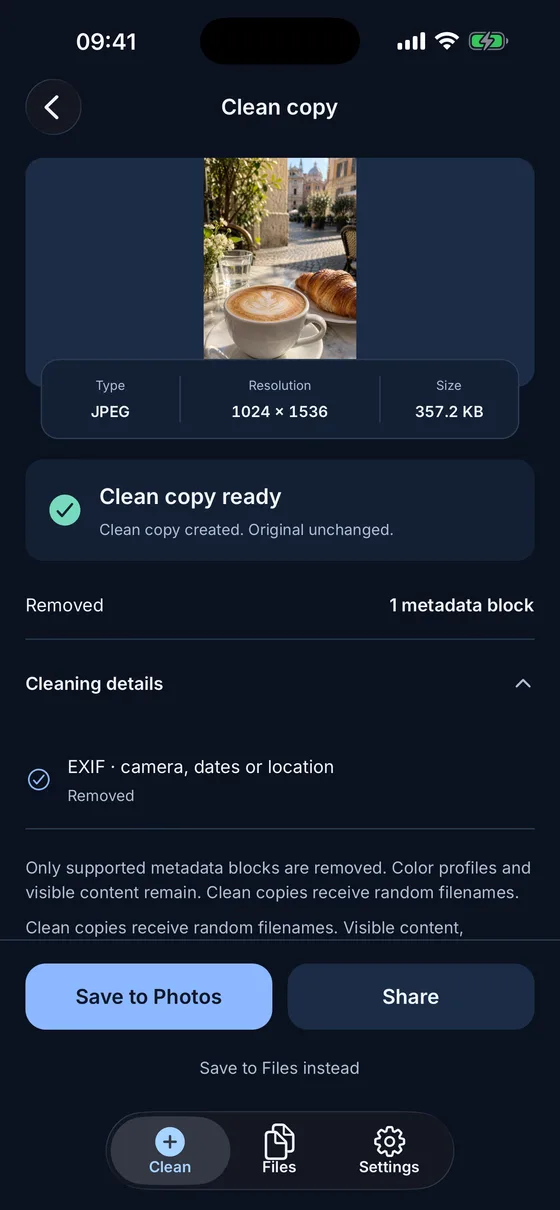
MetaQuiet processes files on the device with no account, uploads, ads or analytics. It is free during early access, and early users keep Pro at no cost when it launches.
Android hides stored camera-photo location from MetaQuiet through both pickers. The app cannot display that location, but the clean copy contains no location either way. The original on the phone may still hold it.
Know what stays and what fits
- Photos: up to 50 MB. Supported descriptive EXIF, XMP, comments and text blocks are removed. A minimal technical EXIF record preserves display orientation. HEIC supports still images only; RAW and BigTIFF are rejected. A JPEG motion photo loses its motion part.
- PDFs: up to 5 MB. MetaQuiet removes PDF Info/XMP. Encrypted, signed, interactive and object-stream PDFs are rejected. Page text, embedded content and annotations remain.
- Office documents: DOCX, XLSX and PPTX up to 50 MB. Standard document properties can be removed, but body text, comments and tracked changes remain.
- Videos and M4A: MP4, MOV, M4A, 3GP and 3G2 up to 250 MB. Other supported files have a 50 MB limit, except PDFs. Video cleaning removes selected container tags and dates; encoded media is preserved, and codec metadata, chapters and attachments may remain.
MetaQuiet handles one file at a time, with no batch cleaning. Unsupported variants are rejected. It does not trim, compress or convert a file to fit a limit, and there is no remote fallback.
Metadata removal leaves the visible picture, page text, frames and sound. Faces, signs, names in a document body and spoken names remain. Review the content itself before sharing.
Common questions
Can I remove EXIF data online for free?
A free online remover may suit a public photo if you accept its upload and retention terms. Check which fields it removes and inspect the returned copy; the price does not tell you where processing happens.
Does removing PDF metadata hide my name in a contract?
Removing an author property does not remove a name printed on the page. MetaQuiet removes supported PDF Info/XMP, while page text, annotations and embedded content remain.
Can MetaQuiet clean a video above its size limit?
No. MP4, MOV, 3GP and 3G2 videos have a 250 MB limit, and other supported video formats have a 50 MB limit. MetaQuiet does not compress or trim them, or upload them for remote processing.
How do I know which copy to send?
Use the clean copy saved or shared from MetaQuiet's result screen after reviewing the rescan. It has a random file name; your original remains unchanged.
MetaQuiet is on the App Store for iPhone and iPad and on Google Play for Android.
Get MetaQuietThis guide in other languages: Deutsch, Español, Français, Italiano, Português (Brasil), Türkçe, 日本語, 한국어