
The short answer for each app
- WhatsApp: photos sent as pictures are re-encoded and lose their EXIF. Photos sent as documents keep their original metadata.
- Telegram: photos sent as pictures are re-encoded and lose their EXIF. Sending as a file keeps the original metadata.
- Signal: removes image metadata by default.
- iMessage, AirDrop and email attachments: send the file as it is, including metadata.
- Instagram, Facebook and X: strip metadata from the published copy, but receive the original upload.
These are commonly documented behaviors and can change. Menus differ by device and version. Inspect a received copy to check what a particular sending method actually delivered.
Why sending as a document changes the answer
Sending a photo as a picture lets WhatsApp or Telegram re-encode it. That process drops its EXIF. Sending the same photo as a document or file preserves the original metadata instead, which can include GPS coordinates, capture dates and camera details.
If you use document sending to preserve the file, clean a separate copy first when those fields should stay private. Select that clean copy when attaching it.
Removing EXIF does not prove that every possible metadata block has been removed. Check the received file rather than treating the sending option as a guarantee.
Does WhatsApp remove metadata from videos?
Do not assume that photo behavior also applies to videos. The behavior described above does not establish which video tags WhatsApp or another messenger removes. Inspect a received video to check the fields it carries.
If you clean a video with MetaQuiet before sending, it removes selected container tags and dates while preserving encoded media. Codec metadata, chapters and attachments may remain.
MP4, MOV, 3GP and 3G2 files can be up to 250 MB. Other supported video formats have a 50 MB limit. Fragmented ISO-BMFF, OpenDML AVI and unknown-sized MKV/WebM clusters are rejected.
Metadata removal leaves visible content
Removing metadata does not hide a street sign, a face, an address visible in a picture or a name spoken in a video. Those details are part of the content, not EXIF or container tags.
Check the picture, frames and sound before sending. If they reveal something private, metadata removal alone does not solve it. MetaQuiet does not redact content.
Check a received copy with MetaQuiet
- Save the received attachment to your photo library or Files. Use the received copy, not the original you sent.
- Open MetaQuiet and choose "Photos & videos" or "Browse Files" to select it.
- Read the supported metadata blocks and readable fields found during inspection.
- If you want to remove supported metadata, clean the file. MetaQuiet creates a separate copy with a random file name.
- Review the rescanned result for what was removed and what stays. Save or share the clean copy from that screen.
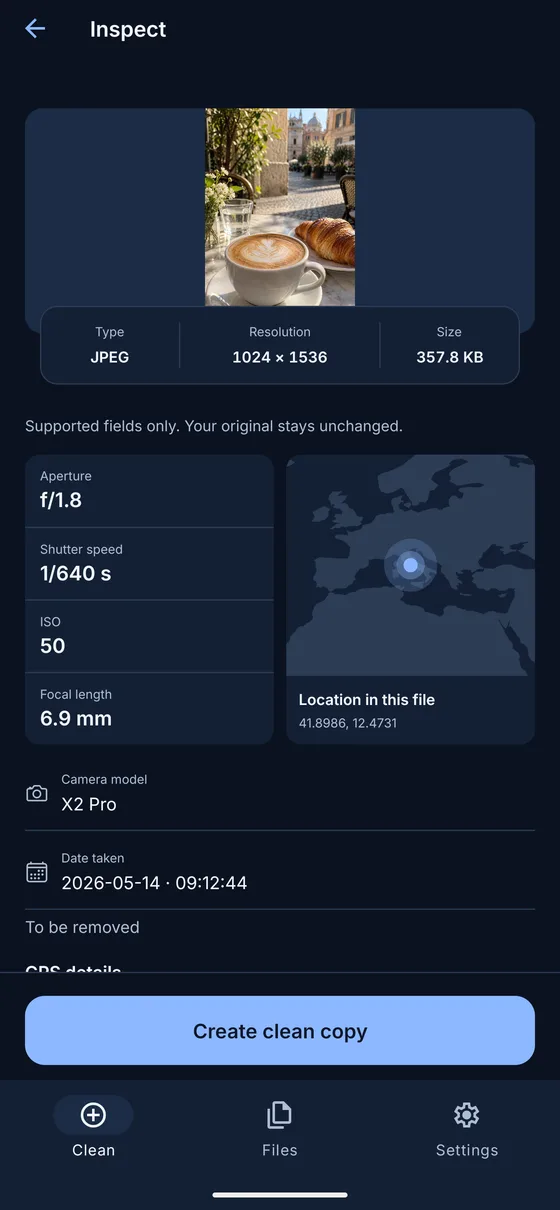
On Android, the system hides stored camera-photo location from MetaQuiet through both pickers because the app does not request media location access. An absent location field does not prove the original has none. Received files usually show their fields normally. On iPhone, location and camera fields appear when they exist.
When to clean before sending
Clean a copy first when sending a photo as a document, using iMessage, AirDrop or email, or uploading somewhere that receives the original. This lets you review supported metadata before the file leaves your phone.
MetaQuiet processes files on the device without uploads. It removes supported descriptive photo metadata while retaining a minimal technical EXIF record for display orientation. Photos have a 50 MB limit; HEIC support is for still images only. RAW and BigTIFF are rejected, and a JPEG motion photo loses its motion part.
The app handles one file at a time. It does not trim, compress or convert files to fit a limit. The original stays unchanged, so make sure you send the clean copy.
Common questions
Does WhatsApp remove location metadata from photos?
Commonly documented behavior is that photos sent as pictures lose their EXIF, including EXIF location data. Photos sent as documents keep their original metadata. A visible location clue in the picture remains.
Does Telegram remove EXIF data?
Telegram commonly drops EXIF when it re-encodes a photo sent as a picture. Sending that photo as a file keeps its original metadata.
Is Instagram safe to use as a metadata remover?
Instagram commonly strips metadata from the published copy, but receives the original upload. If you want supported metadata removed before uploading, clean a copy first.
Does an empty inspection mean the file reveals nothing?
No. Inspection reports supported metadata it can read, and the file's visible or audible content can still reveal private information. Android also hides stored camera-photo location from MetaQuiet.
MetaQuiet is on the App Store for iPhone and iPad and on Google Play for Android.
Get MetaQuietThis guide in other languages: Deutsch, Español, Français, Italiano, Português (Brasil), Türkçe, 日本語, 한국어